|
Hey there! 👋
I rarely talk about tools, but when something completely transforms the way I work, I can’t help but share it. And no, this isn’t a promo—it’s just me geeking out over something awesome.
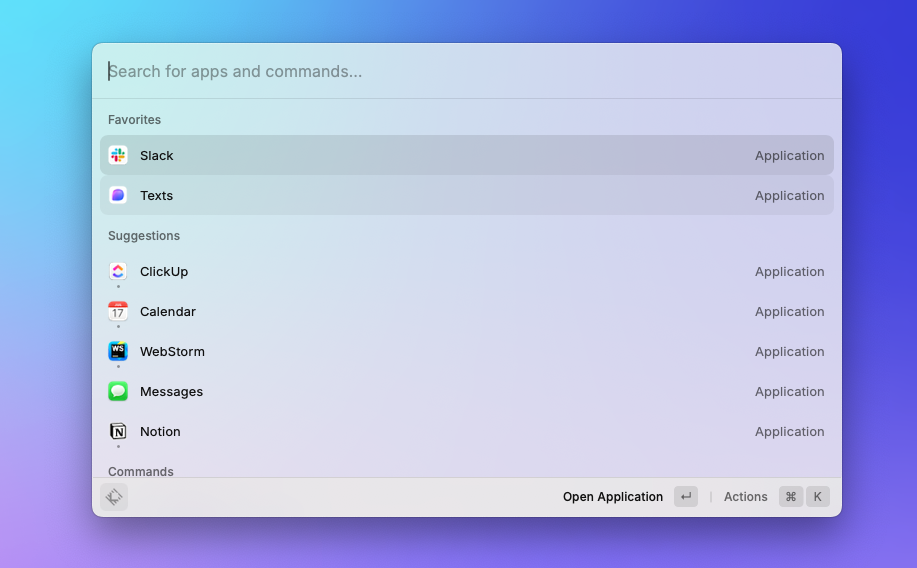
Let’s talk about Raycast, the Mac app that’s taken over my workflow. Seriously, it’s a game-changer.
Raycast is like my personal supercharged Mac assistant. Whether it’s opening apps, managing windows, or automating tasks, it does it all—and fast. Once I started using it, there was no going back!
|
|
|
Stick around as I walk you through:
- What Raycast is all about
- Why I love it
- My favorite add-ons to supercharge productivity
|
|
|
What Is Raycast?
Think of Raycast as your Mac’s Swiss Army knife. It’s an app launcher, task runner, and automation wizard all rolled into one. Plus, you can tweak it to work exactly how you like, thanks to powerful customization options and add-ons.
You can:
- Open apps in seconds
- Run commands
- Manage your clipboard, windows, and even system settings—all without touching your mouse.
|
|
|
Raycast vs. Spotlight? No Contest!
Spotlight feels like a butter knife compared to Raycast’s Swiss Army knife. It’s faster, smarter, and integrates seamlessly with your favorite tools.
Once you try Raycast, you’ll wonder how you ever managed without it.
|
|
|
Why I’m Obsessed with Raycast
1. It’s All-in-One
I ditched my clipboard manager, window organizer, and text expander because Raycast does it all. Fewer apps = smoother Mac performance!
2. Keyboard-First Magic
Forget clicking around. Raycast lets me do everything with shortcuts, keeping my hands on the keyboard and my workflow lightning-fast.
3. Fully Customizable
Want a feature it doesn’t have? Build it yourself using React and Typescript and share them with the community which is very active and helpful! (Or browse the Raycast Extension Store for tons of free add-ons.)
|
|
|
How I Use Raycast
Replaced Spotlight
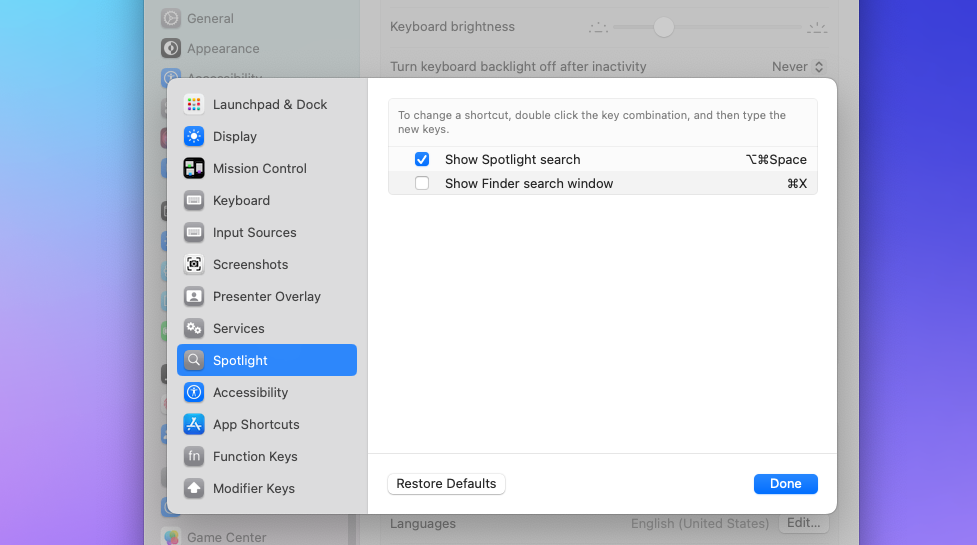
I set Raycast to launch with CMD+Space. Now, it’s my go-to for everything—searching, launching apps, and more. Here is how you can replace Spotlight with Raycast.
|
|
|
Favorite Add-ons
Here are the ones I can’t live without:
• Clipboard History: Saves everything I copy. A lifesaver!
• Window Manager: Move and resize windows in a snap.
• Snippets: Create, manage, and use custom snippets for faster typing, email responses, and coding!
• System Settings: Quick toggles for Dark Mode, volume, and more.
|
|
|
The Price? Free!
Raycast is free to use, with optional Pro and Team plans for advanced features like AI tools and sharing shortcuts.
Why Wait? Try It Today!
If you’re on a Mac, you owe it to yourself to give Raycast a shot. It’s fast, powerful, and endlessly customizable. Download it today—it just might change how you work!
👉 Get Raycast Now
|
|
|
Join iGeeksBlog Premium: Support, Explore, and Enjoy!
🤝 An iGeeksBlog Premium membership is the best way to support our work and ensure the sustainability of our blog and newsletter.
Here's how we'll thank you:
✅ Ad-free reading experience across our site
✅ Exclusive members-only articles and newsletters like this one
✅ Free eBooks tailored to your interests
✅ Designed and Curated wallpapers just for you
✅ Editor's support
And much more...
|
|
|
|
|
Thank you again for joining iGeeksBlog+. I look forward to embarking on this exciting journey with you!
Best regards,
Dhvanesh
Founder, iGeeksBlog
|
iGeeks Media Private LTD. B-612, Ratnaakar Nine Square, Vastrapur, Ahmedabad, Gujarat 380015
Unsubscribe · Preferences
|
|
|